

Managing remote and hybrid teams: a 30-day playbook
Five ways a remote or hybrid team goes wrong, the routine that fixes each and how to tell which one you have.
The short version
- Work out which of five problems your team has before you change anything.
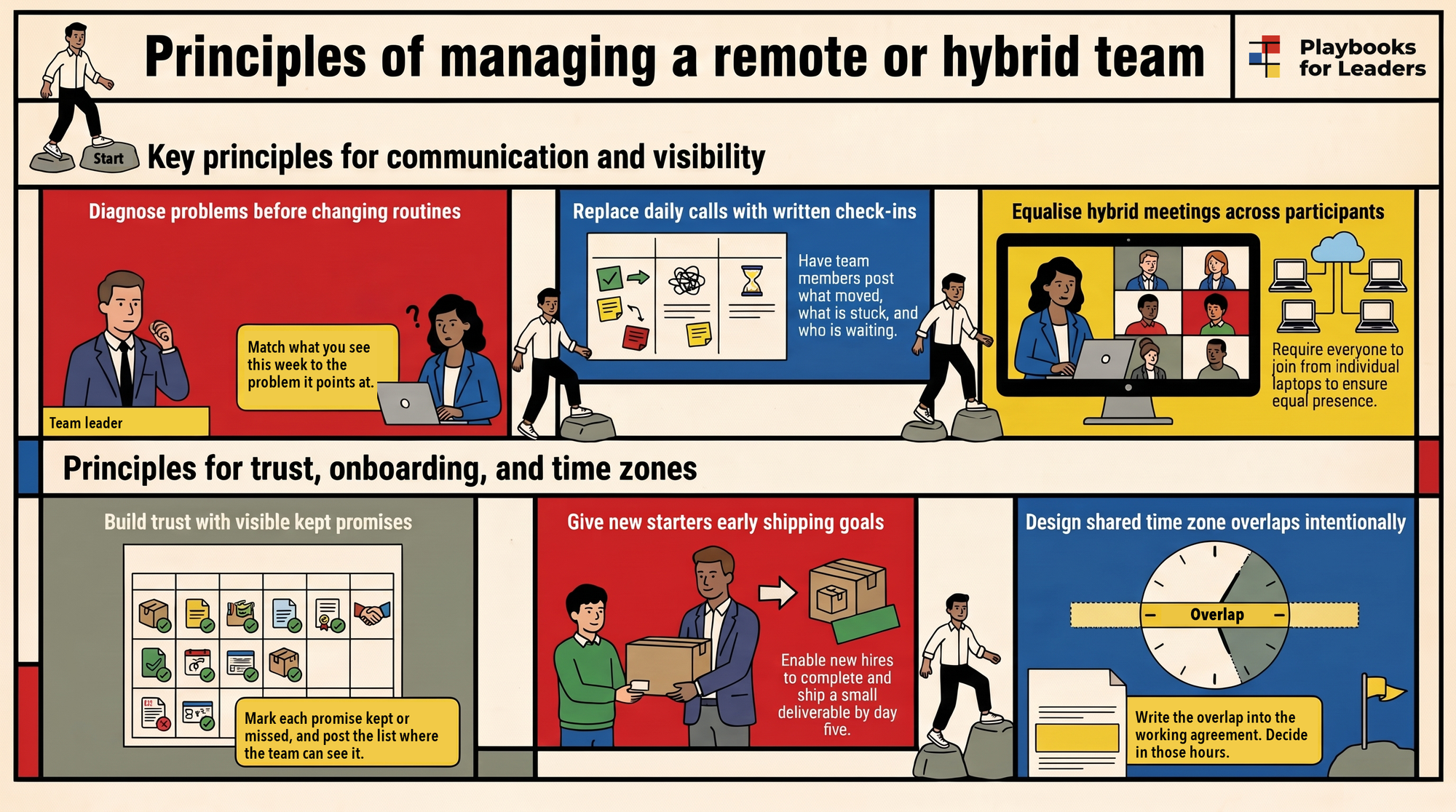
- Replace the daily call with a written check-in: what moved, what's stuck and who's waiting on you.
- In a hybrid meeting, give everyone their own screen, including the people in the office.
- Build trust by keeping promises where people can see you keep them.
- Give a new starter something to ship by their fifth day.
- Run one routine for two weeks, then judge it.
Contents
- What is the fastest way to find out what's wrong?
- Why does work go missing in a remote team?
- How do you run a meeting when half the team is in the room?
- How do you build trust with people you rarely see?
- What should a new starter's first 30 days look like?
- How do you manage across time zones?
- Which software helps?
- How is a remote sales team different?
Five problems turn up in remote and hybrid teams. You can't see the work. The calendar fills with meetings. People stop trusting you, or each other. New starters drift. One time zone carries the early calls. Each one has its own routine, and the routine for one does nothing for another. So start by working out which one you have.
What is the fastest way to find out what's wrong?
Match what you see this week to the problem it points at.
| What you see | The problem | Playbook |
|---|---|---|
| Cameras off, nobody pushes back, nobody asks | People have stopped trusting that speaking up is worth it | Room's gone quiet |
| The calendar is full by Tuesday and every thread ends in a call | Too many meetings, standing in for work nobody can see | Same meeting again |
| You can't say what each person did last week, and a deliverable surprised you | You can't see the work | Project slipping |
| A new starter is still asking basic questions in week three | Onboarding stopped after the first day | New starter |
| One region always takes the 8am call, and morale dropped there first | One time zone carries the cost | Falling morale |
If two rows fit, pick the one with the clearest evidence and run its routine for two weeks. Write down what changed. If nothing moved, you picked the wrong row, so try the next. Two weeks is long enough to see a difference and short enough that a wrong guess costs little.
The Diagnose first Playbook covers this step for any team, remote or not.
Why does work go missing in a remote team?
Work goes missing in three places. A decision gets made in a chat and never reaches the tracker. Someone is stuck and doesn't want to look stuck. Someone hits a problem at four in the afternoon in their time zone, and you're asleep. None of these is anyone's fault. They're what happens when nothing gets written down.
A written check-in
Replace the daily call with a written check-in that each person posts before their day ends. Three questions: what moved, what's stuck and who's waiting on me. Give yourself ten minutes to read the lot and five to reply. A call gives the floor to whoever speaks first. A written check-in gives everyone the same space, and it's still there when the call would have been cancelled.
In October 2021 Basecamp, which makes project software, asked its own staff two questions automatically: "What did you work on today?" and "What will you be working on this week?" (David Heinemeier Hansson, October 2021). GitLab, which has no offices, goes further: its handbook says the conclusions of conversations held outside the written channels get written down (GitLab, Communication).
A weekly demo
Once a week, give someone 30 minutes to show working output, not slides.
- Ask each presenter to say which decision the demo should settle.
- Run the demo.
- Write one line on what changed, and post it where the team works.
If nobody has anything to show, you've found where the work went missing.
How do you run a meeting when half the team is in the room?
In a hybrid meeting, the people on the screen watch a room they can't read and wait for a gap in the talk. Change how the meeting runs.
In a Microsoft survey published in March 2022, 43% of remote employees and 44% of hybrid employees said they didn't feel included in meetings. Only 27% of organisations had set new rules for how hybrid meetings run (Microsoft Work Trend Index, 2022).
One person, one screen
Everyone joins from their own laptop, including the people in the office. Every face is the same size, the sound is the same for everyone and the side conversations stop. If the office has no headsets or quiet rooms, that's a facilities problem to fix this week. It isn't a reason to keep two classes of attendee.
Send the reading a day ahead
Send the papers 24 hours before, then spend the first few minutes reading them in silence. People on the screen get time to form a view before the room agrees without them. If a meeting can't survive the reading going out first, it was a status update, and an email will do.
Rotate the chair
Hand the chair to someone different each week, and let the people who join remotely pick their weeks first. The chair has one job: take questions from the screen before the room. If the same meeting keeps coming back with nothing decided, the Same meeting again Playbook and the Wicked Questions tool will help you write down the contradiction underneath it.
How do you build trust with people you rarely see?
You can't socialise your way out of a trust problem. A team that rarely sees you trusts you when you say what you'll do, do it and say so when you don't.
A weekly promise check
Once a week, list the promises you made last week. Mark each one kept or missed, and explain each miss in one sentence. Post it where the team can see it, then ask each person to do the same with theirs. A quiz about someone's weekend won't do what a month of kept promises does.
One-to-ones over video
Keep one shared document for each person, which they own. Give it three standing items: what's on their desk this week, your feedback since last time and one decision you owe them. If a one-to-one has to move, move it. Don't cancel it. If the subject is a hard one, ask them to write their side in the document before the call, so the quieter person has said their piece before anyone talks over them. Our guide to one-to-one meetings has an agenda you can copy.
When the team goes quiet
If a remote team goes quiet, ask one person a week, in writing: "What decision are you waiting on from me?" Then answer within a day. The Room's gone quiet Playbook has two first moves for a silent meeting. Ask the naive question about the thing everyone takes for granted. Or ask for the worst ideas, which takes the pressure off being right.
What should a new starter's first 30 days look like?
A remote new starter drifts when nobody gives them something real to finish. In Microsoft's 2022 survey, 62% of leaders worried that new employees weren't getting the support they needed after the move to hybrid or remote work (Microsoft Work Trend Index, 2022). Plan the month in three parts.
- Before they start, pick something small and real for them to ship by the end of the first week: a document, a fix, a checklist. The point is to show them the route from new to done. If they can't ship it by day five, look at your onboarding before you look at them.
- From day 6 to day 20, give them one named buddy, not a committee, who answers questions within a few hours. Ask the new starter to draw a map of how work moves: who approves what, where decisions get written down and which meetings matter. Go through the map with them in week three. What they get wrong shows you what nobody explained.
- From day 21, hand them a piece of work with a real deadline, sized for two weeks. Check in at the midpoint, not every day. By day 30 you'll know whether they can work on their own, and they'll know whether the job matches the advert.
The New starter Playbook offers a different opening if your new starter is a capable self-starter: hand them a blank document and 30 minutes to draft their own first week. Use the Agile Team Onion to show them who matters, from the core team out to the wider organisation.
How do you manage across time zones?
Treat time zones as a design problem. Stamina won't fix them.
Set the overlap
Find the two or three hours when everyone can be online at once, and write them into the team's working agreement. Anything that needs a decision happens in those hours. Everything else waits for writing. Ask the team to write the working agreement themselves. The Working Agreements tool explains why one a manager imposes fails.
Write by default
Start with writing: a short document before the meeting and the decision recorded after it. Call a meeting only when the question is unclear, disputed or sensitive. If you can't say which of the three it is, send the document. The exception is a new starter, who needs more live time in the first few weeks.
Share the early calls
If a regular call lands at an unreasonable hour for one region, rotate the time each month so the cost moves round the team.
Which software helps?
Judge a tool by four questions before you buy it.
- Does it cut the number of places you look for status?
- Does it work without everyone online at once?
- Will you see a difference in the first week?
- Does it fix one of the five problems above, or move the work somewhere else?
A project tracker helps you see the work, if people update it. If they don't, you have two places to look instead of one. Recorded video updates cut meetings, if someone writes down the decision in each one. A documentation tool helps new starters, if someone owns the writing.
Where a Playbook library fits
Software runs the workflow. It won't tell you what to say in the meeting that's going to be a fight, or how to explain why the project slipped. At Playbooks for Leaders we wrote 40 Playbooks for situations like those. A Playbook won't track your tickets or replace your check-ins, and if your problem is a missing tool, buy the tool.
How is a remote sales team different?
A product team produces decisions and releases. A sales team produces a number that moves or doesn't. So in a sales team you review the pipeline: how many deals move from each stage to the next, how old each deal is and what stalled since last week.
Remote salespeople can drift into activity that looks like work: more calls logged, fewer deals closed. Review the next step on each deal that matters, not a dashboard of dials. Everything else in this guide still applies. The difference is that you review a deal where a product team would review a ticket.
FAQ
What's the hardest part of managing a remote team?
Seeing the work. Decisions disappear into chats, stuck people stay quiet and problems arrive while you're asleep. Start with a written check-in, so a blocker shows up before it becomes a missed date.
How do you keep remote people accountable without micromanaging?
Check promises, not hours. Run the weekly promise check on yourself first, then with the team, alongside the written check-in and a shared one-to-one document. If you check hours, people learn to look busy.
Is hybrid or fully remote easier to manage?
Fully remote, because everyone joins the same way and writing becomes the habit for all of them. Hybrid splits a meeting into the people in the room and the people on the screen. Hybrid can work, if you change how the meetings run.
How often should a remote team meet in person?
Nobody can give you a number. Give each get-together a job a status update can't do: build trust, settle a hard decision or bring new people in. If you can't say what the get-together will decide or repair, put it off and spend the money on fewer, better ones.
What should a new manager of a remote team learn first?
Writing. The check-in, the reading before the meeting and the one-to-one agenda all depend on it. After that, learn to work out which of the five problems you have before you pick a routine.
Sources on remote and hybrid teams
- Remote: Office Not Required by Jason Fried and David Heinemeier Hansson. It's our source for the case for remote work from the people who run Basecamp, and for the habits they use to make it work. If you want the book itself, buy it from Bookshop.org or Amazon.
- Out of Office by Charlie Warzel and Anne Helen Petersen. It's our source for how a team splits its time between home and office. The authors argue for setting up flexible work around trust and fairness. If you want the book itself, buy it from Bookshop.org or Amazon.
Some book links on this page are affiliate links. If you buy through one, we earn a small commission.